![kRush DMA [Rust]](https://www.buyhack.pro/storage/products/DlrEGPoWsiIa1d7zgSGNza2reYANTpq6pegHhhm7.webp)
ON UPDATE
kRush DMA [Rust]
UPDATING
This product is currently being updated and is temporarily unavailable for purchase. Please check back shortly.
Instant Delivery to Email & Site
AIMBOT:
- Target selection, bones and smoothing.
- Aimbot
- Switch it on and set your aim key.
- Enable aimbot
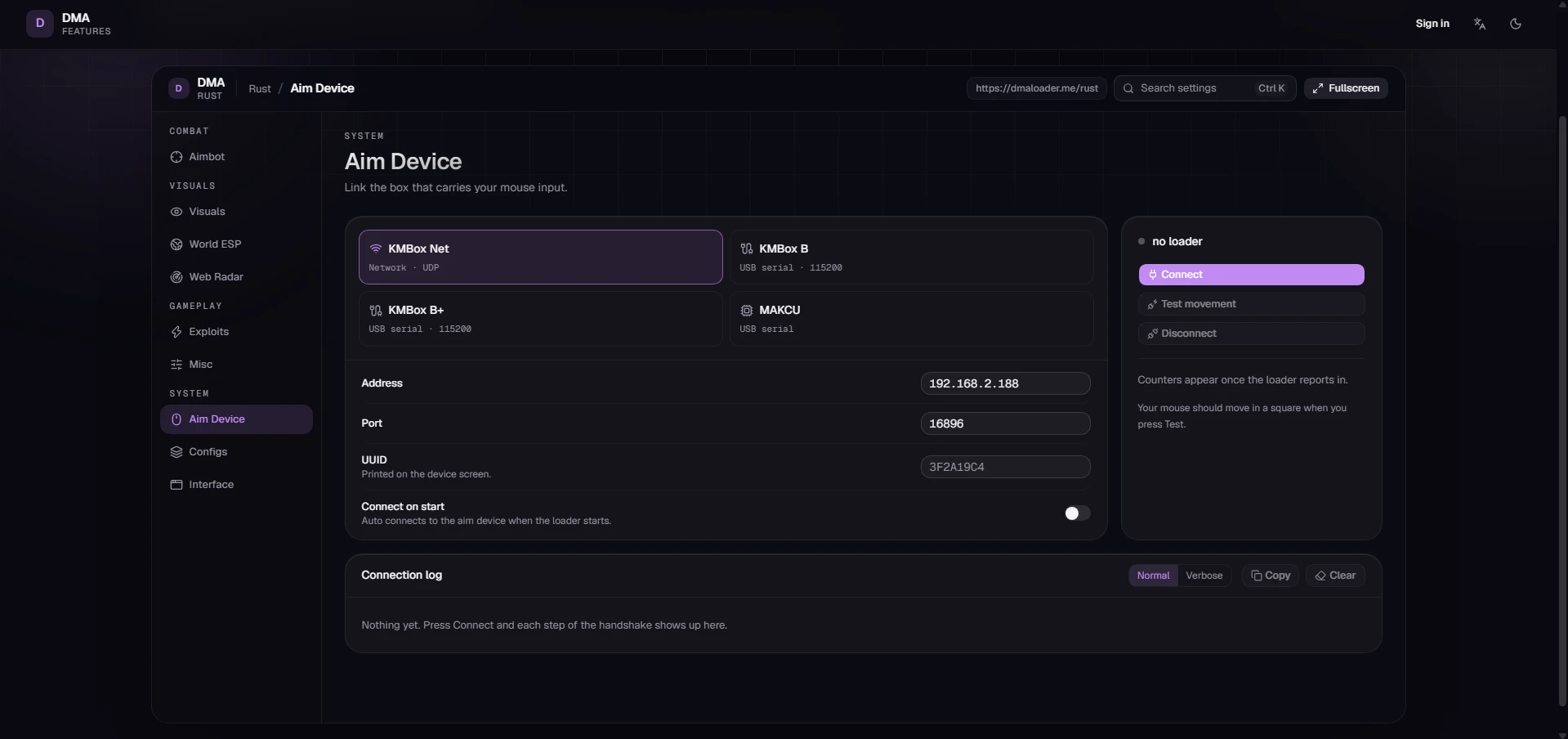
- Connect an aim device on the Aim Device tab first.
- Aim key
- The key you hold to aim.
- Second aim key
- A secondary aim key. Either one works.
- Filters
- Choose who the aimbot can target.
- Only target visible
- Ignore anyone not visible.
- Ignore teammates
- Never aim at your own team.
- Ignore sleepers
- Never aim at sleeping players.
- Max distance
- Ignore anyone past this distance.
- 120m
- Target selection
- Pick your target and where it aims.
- Target bones
- Tick the bones the aimbot can aim at.
- Bone priority
- Which bone to prefer when several are ticked.
- Crosshair
- Most damage
- Target priority
- How it picks between multiple targets.
- Crosshair
- Distance
- Hard lock
- Stay locked on one target until they're gone.
- Prefer visible
- Prefer targets you can actually see.
- Field of view
- How far from your crosshair it locks on.
- Field of view
- Your FOV size, in degrees.
- 12°
- Draw FOV circle
- Shows your FOV on screen.
- FOV circle colour
- Colour of the FOV circle.
- Aim movement
- How smooth and natural the aim feels.
- Human movement
- How natural the aim movement looks.
- Off
- Light
- Mix
- Max
- Smoothing
- Higher is slower and smoother.
- 8.0
- Deadzone radius
- Stops fine-tuning once you're this close.
- 5
- Delays
- Tiny delays that make it look human.
- Reaction delay
- Wait this long before aiming kicks in.
- 150ms
- Bone swap delay
- How long to stay on the same bone.
- 250ms
- Player swap delay
- How long before it switches targets.
- 350ms
- Ballistics
- Auto-adjusts for bullet drop and travel.
- Predict travel
- Aims ahead for bullet drop and target movement.
- Draw predicted point
- Shows where to aim to land the shot.
- Predicted point colour
- Colour of the aim marker.
- Predicted point size
- Size of the marker.
VISUAL:
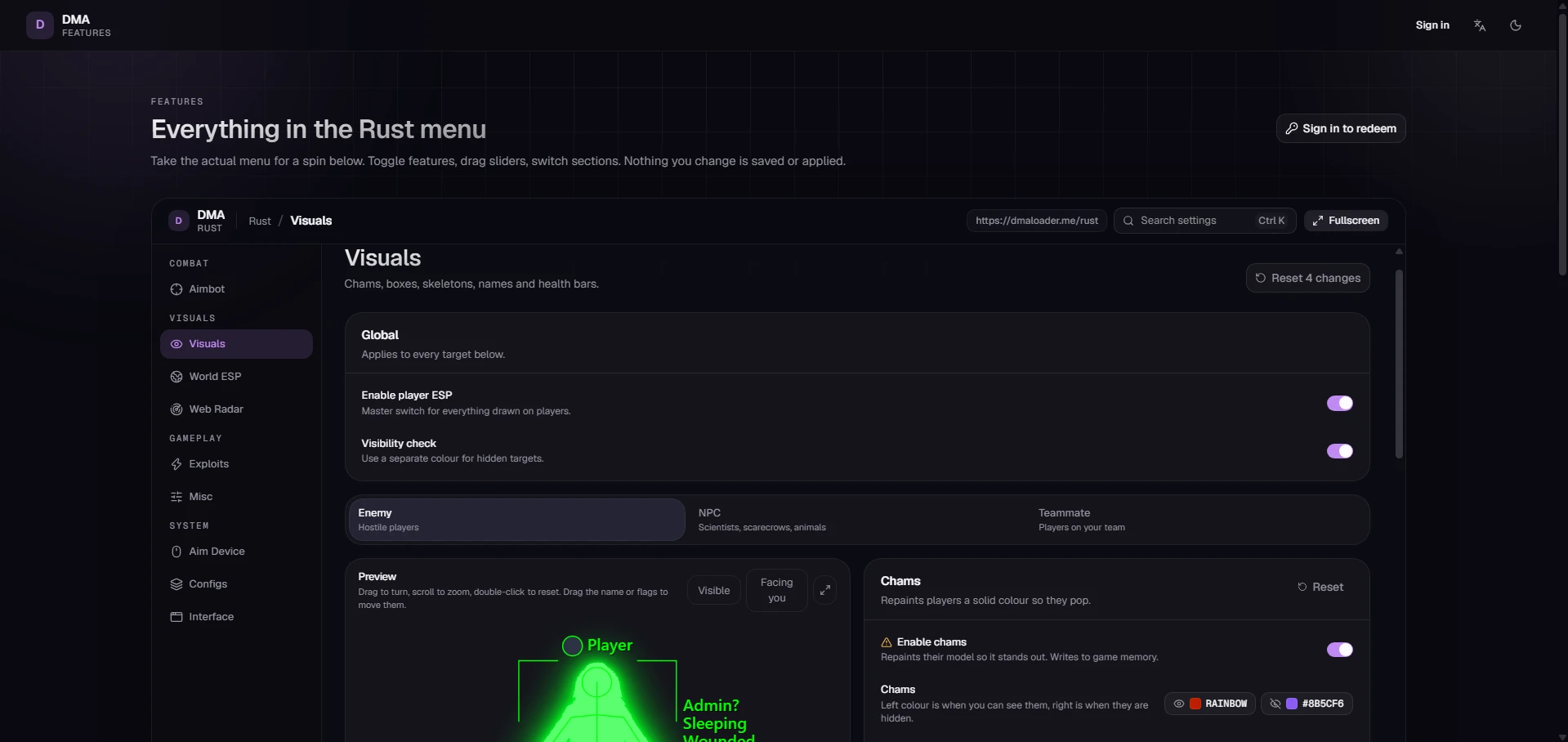
- Enable player ESP
- Master switch for everything drawn on players.
- Visibility check
- Use a separate colour for hidden targets.
- Enemy
- Hostile players
- NPC
- Scientists, scarecrows, animals
- Teammate
- Players on your team
- Preview
- Drag to turn, scroll to zoom, double-click to reset. Drag the name or flags to move them.
- Visible
- Facing you
- Chams
- Repaints players a solid colour so they pop.
- Enable chams
- Turn on Allow memory writing under Exploits first.
- Chams
- Left colour is when you can see them, right is when they are hidden.
- Glow
- Makes the colour bloom instead of sitting flat.
- Skeleton
- Skeleton lines drawn over players.
- Draw skeleton
- Draws bone lines over their body.
- Skeleton
- Left colour is when you can see them, right is when they are hidden.
- Thickness
- How thick the skeleton lines are.
- 1.2
- Box
- A box drawn around players.
- Style
- Box shape. Corner styles draw only the corners.
- Off
- 2D
- 2D corner
- 3D
- 3D corner
- Box
- Left colour is when you can see them, right is when they are hidden.
- Thickness
- How thick the box lines are.
- 1.4
- Head circle
- A ring around the head.
- Draw head circle
- Draws a ring around their head.
- Thickness
- How thick the head ring is.
- 1.2
- Names
- The player's name above or below them.
- Draw names
- Shows their Steam name.
- Name
- Left colour is when you can see them, right is when they are hidden.
- Position
- Put the name above or below them.
- Above
- Below
- Size
- Text size of the name.
- 20px
- Flags
- Small status tags drawn next to the box, like admin or sleeping.
- Shown flags
- Pick which status tags are drawn next to the box.
- IsAdmin
- Sleeping
- Wounded
- Aiming
- Incapacitated
- Ragdolling
- Flags
- Left colour is when you can see them, right is when they are hidden.
- Position
- Put the flag tags on the left or right of the box.
- Left
- Right
- Size
- Text size of the flag tags.
- 20px
- Avatars
- Steam avatar next to the name.
- Draw avatars
- Shows their Steam profile picture next to the name.
- Avatar border
- Left colour is when you can see them, right is when they are hidden.
- Size
- How big the avatar is.
- 24px
- Inventory
- Show the nearest player's hotbar and gear.
- Draw hotbar
- Shows the belt items of whoever you are looking at.
- Draw wearing
- Shows the armour of whoever you are looking at.
- General
- Applies to everything drawn for this target.
- Estimated health
- A rough health bar based on the damage you've dealt.
- Skip sleepers
- Stop drawing sleeping players.
- Max distance
- Stop drawing them past this distance.
WORLD ESP:
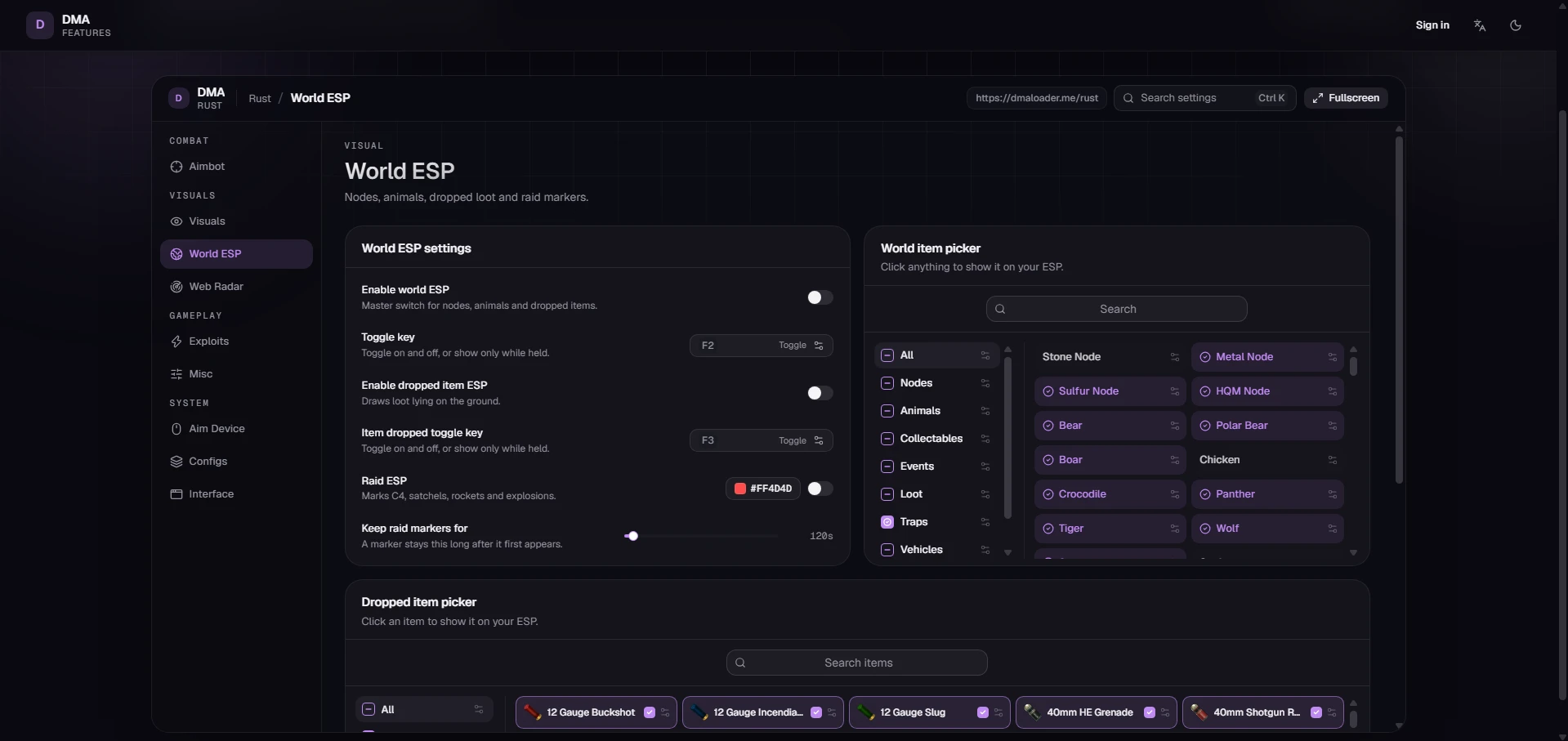
- World ESP settings
- Enable world ESP
- Master switch for nodes, animals and dropped items.
- Toggle key
- Toggle on and off, or show only while held.
- Enable dropped item ESP
- Draws loot lying on the ground.
- Item dropped toggle key
- Toggle on and off, or show only while held.
- Raid ESP
- Marks C4, satchels, rockets and explosions.
- Keep raid markers for
- A marker stays this long after it first appears.
- 120s
- World item picker
- Click anything to show it on your ESP.
- Search
- All
- Nodes
- Animals
- Collectables
- Events
- Loot
- Traps
- Vehicles
- Plus 83+ More
WEB RADAR:
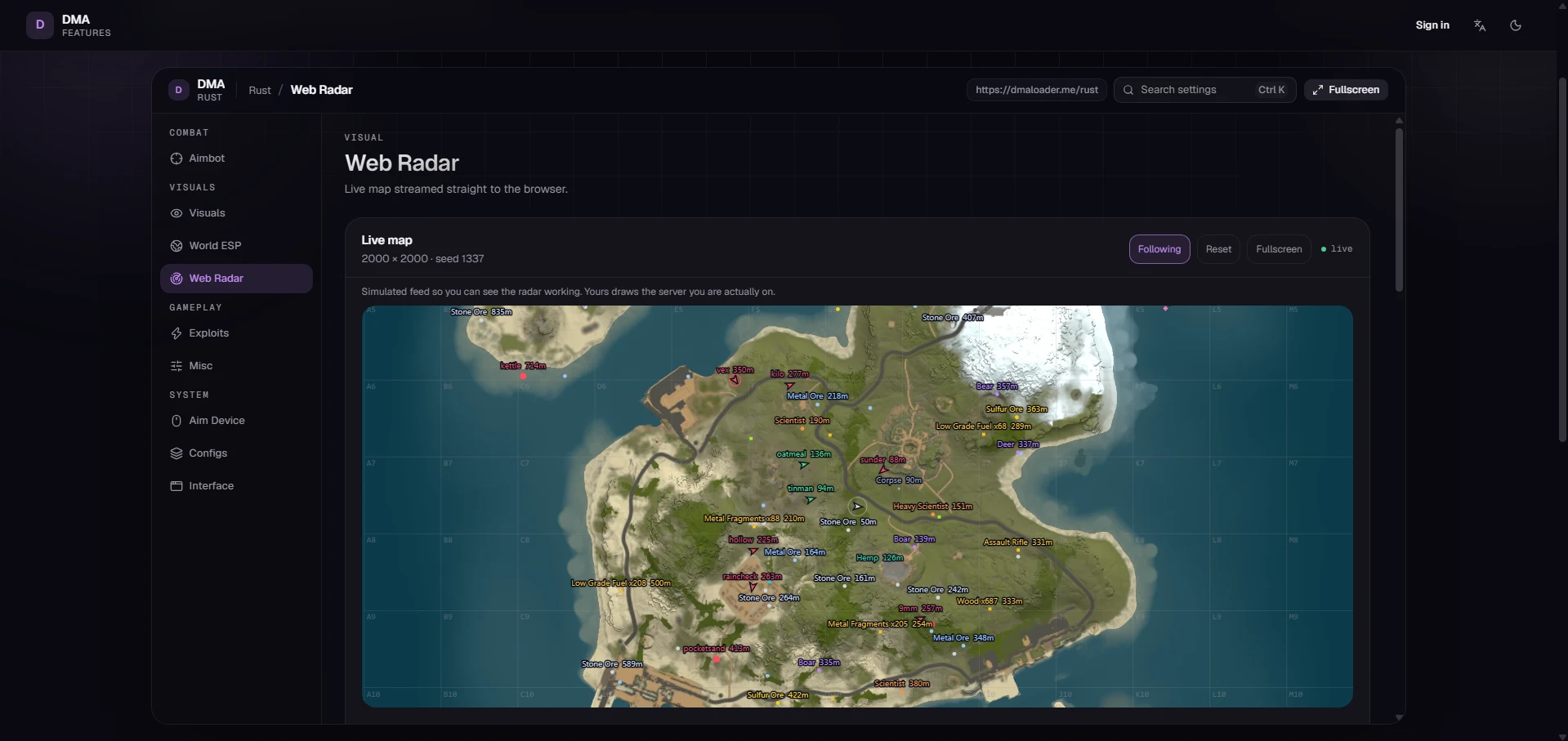
- Live map
- 2000 × 2000 · seed 1337
- Following
- Reset
- Fullscreen
- live
- Simulated feed so you can see the radar working. Yours draws the server you are actually on.
- Scroll or pinch to zoom · drag to pan
- Share links
- 0/5 active
- Anyone with a link sees this radar live.
- Link name, e.g. squad
- Never expires
- No share links yet. Name one above to hand out a live view of this radar.
- Stream
- Choose what shows on your web radar. Works separately from your in-game ESP.
- Enable web radar
- Streams a live map you can open on your phone or a second screen.
- Update rate
- How often moving blips refresh.
- 15Hz
- Stream players
- Send player positions to the radar.
- Include names
- Include player names on the radar.
- Display
- Preview options for this page only.
- Enemies
- Show enemy blips on this page.
- Teammates
- Show teammate blips on this page.
- NPCs
- Show scientist and scarecrow blips on this page.
- Sleepers
- Show sleeping players on the radar.
- Raid ESP
- Show C4, satchels, rockets and explosions on the radar.
- Name and distance
- Label each blip with its name and distance.
- Map grid
- Draws the lettered map grid over the radar.
- Icon scale
- How big the blips are on this page.
- 1.0×
- World settings
- Pick what the radar streams, separately from the World ESP tab.
EXPLOITS:
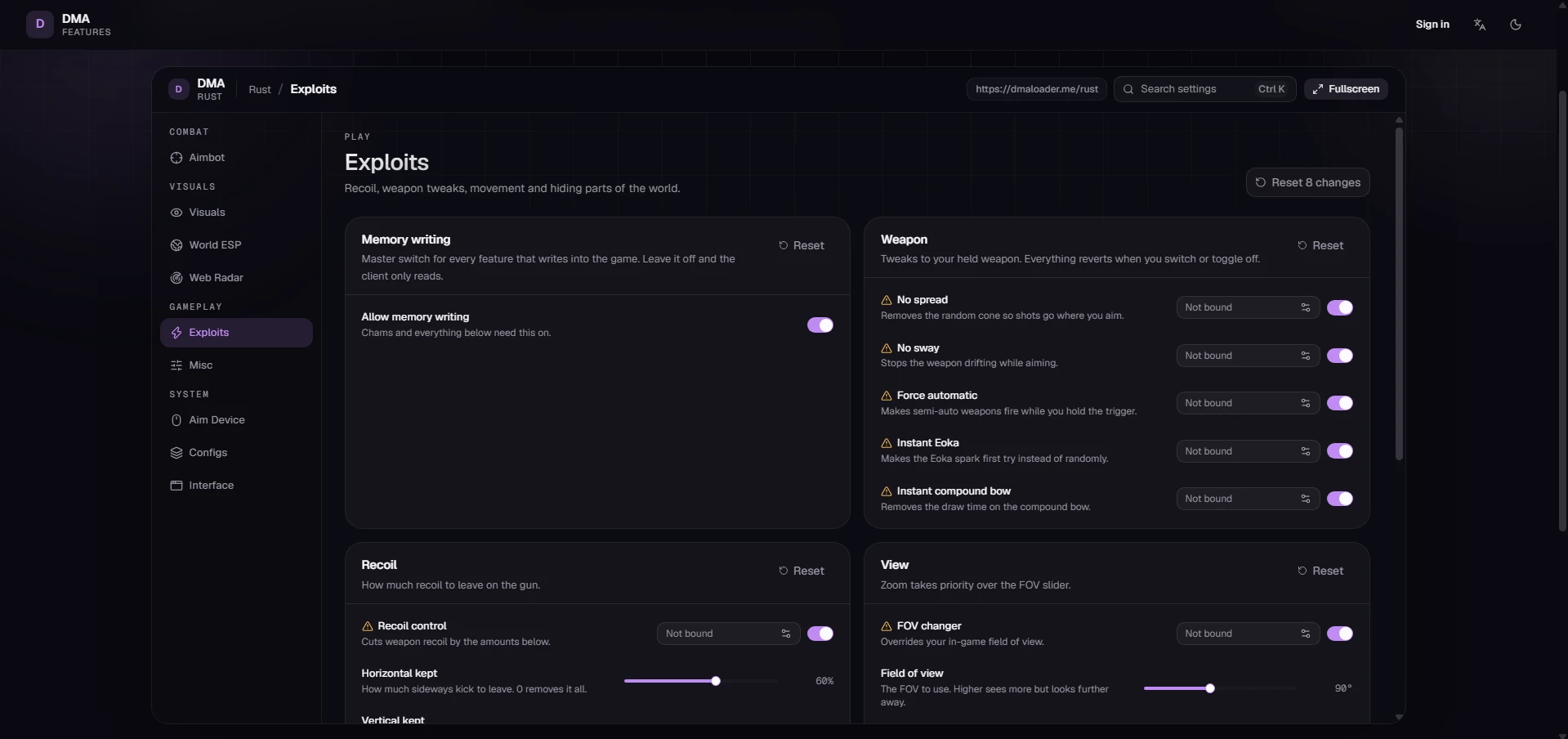
- Memory writing
- Master switch for every feature that writes into the game. Leave it off and the client only reads.
- Allow memory writing
- Chams and everything below need this on.
- Weapon
- Tweaks to your held weapon. Everything reverts when you switch or toggle off.
- No spread
- Turn on Allow memory writing under Exploits first.
- No sway
- Turn on Allow memory writing under Exploits first.
- Force automatic
- Turn on Allow memory writing under Exploits first.
- Instant Eoka
- Turn on Allow memory writing under Exploits first.
- Instant compound bow
- Turn on Allow memory writing under Exploits first.
- Recoil
- How much recoil to leave on the gun.
- Recoil control
- Turn on Allow memory writing under Exploits first.
- Horizontal kept
- How much sideways kick to leave. 0 removes it all.
- 60%
- Vertical kept
- How much upward kick to leave. 0 removes it all.
- 60%
- View
- Zoom takes priority over the FOV slider.
- FOV changer
- Turn on Allow memory writing under Exploits first.
- Field of view
- The FOV to use. Higher sees more but looks further away.
- 90°
- Zoom
- Turn on Allow memory writing under Exploits first.
- Zoom field of view
- How far to zoom. Lower is more zoomed in.
- 30°
- Movement
- Handy extras. Best used only when you need them.
- Spider man
- Turn on Allow memory writing under Exploits first.
- Gravity
- Turn on Allow memory writing under Exploits first.
- Gravity scale
- 100% is normal. Lower floats, higher drops faster.
- 100%
- Speed
- Turn on Allow memory writing under Exploits first.
- Speed multiplier
- 100% is normal walking speed. Obvious to others if pushed high.
- 100%
- Remove layers
- Hide whole types of objects from your view.
- Remove layers
- Turn on Allow memory writing under Exploits first.
- Layers
- Tick anything you want hidden from view.
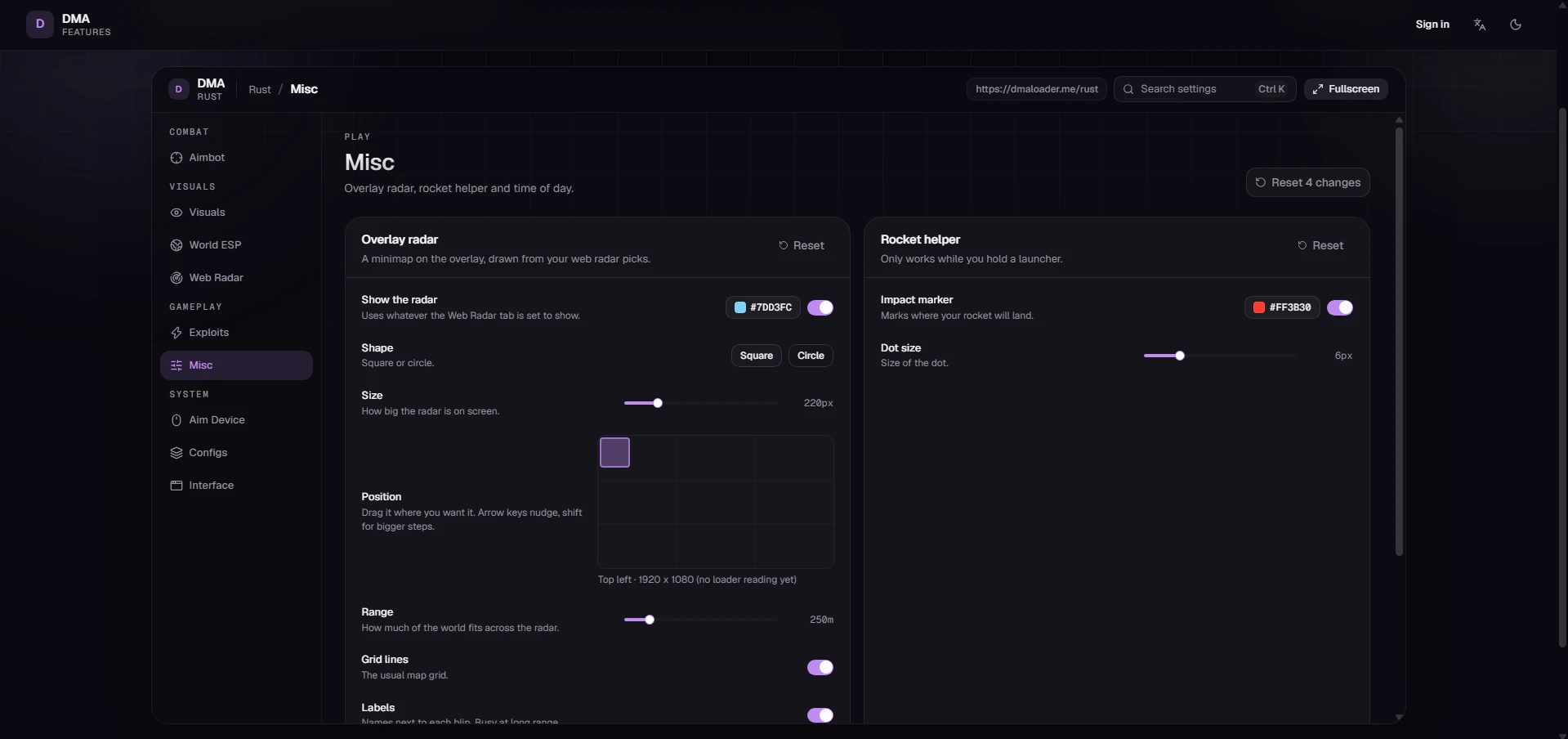
MISC:
- Overlay radar
- A minimap on the overlay, drawn from your web radar picks.
- Show the radar
- Uses whatever the Web Radar tab is set to show.
- Shape
- Square or circle.
- Square
- Circle
- Size
- How big the radar is on screen.
- 220px
- Position
- Drag it where you want it. Arrow keys nudge, shift for bigger steps.
- Top left · 1920 x 1080 (no loader reading yet)
- Range
- How much of the world fits across the radar.
- 250m
- Grid lines
- The usual map grid.
- Labels
- Names next to each blip. Busy at long range.
- Rocket helper
- Only works while you hold a launcher.
- Impact marker
- Marks where your rocket will land.
- Dot size
- Size of the dot.
- 6px
- Time of day
- Pick any time and it stays there.
- Change time of day
- Turn on Allow memory writing under Exploits first.
- Time
- 00:00 is midnight, 12:00 is midday.
- Supported Windows : Windows 10 & 11 (All Builds)
- Important: None (DMA Setup Required)
YOU MIGHT ALSO LIKE
REVIEWS
Reviews for kRush DMA [Rust]
Reviews are moderated before publication
No reviews yet. Be the first!