Arcane [Rob Run]
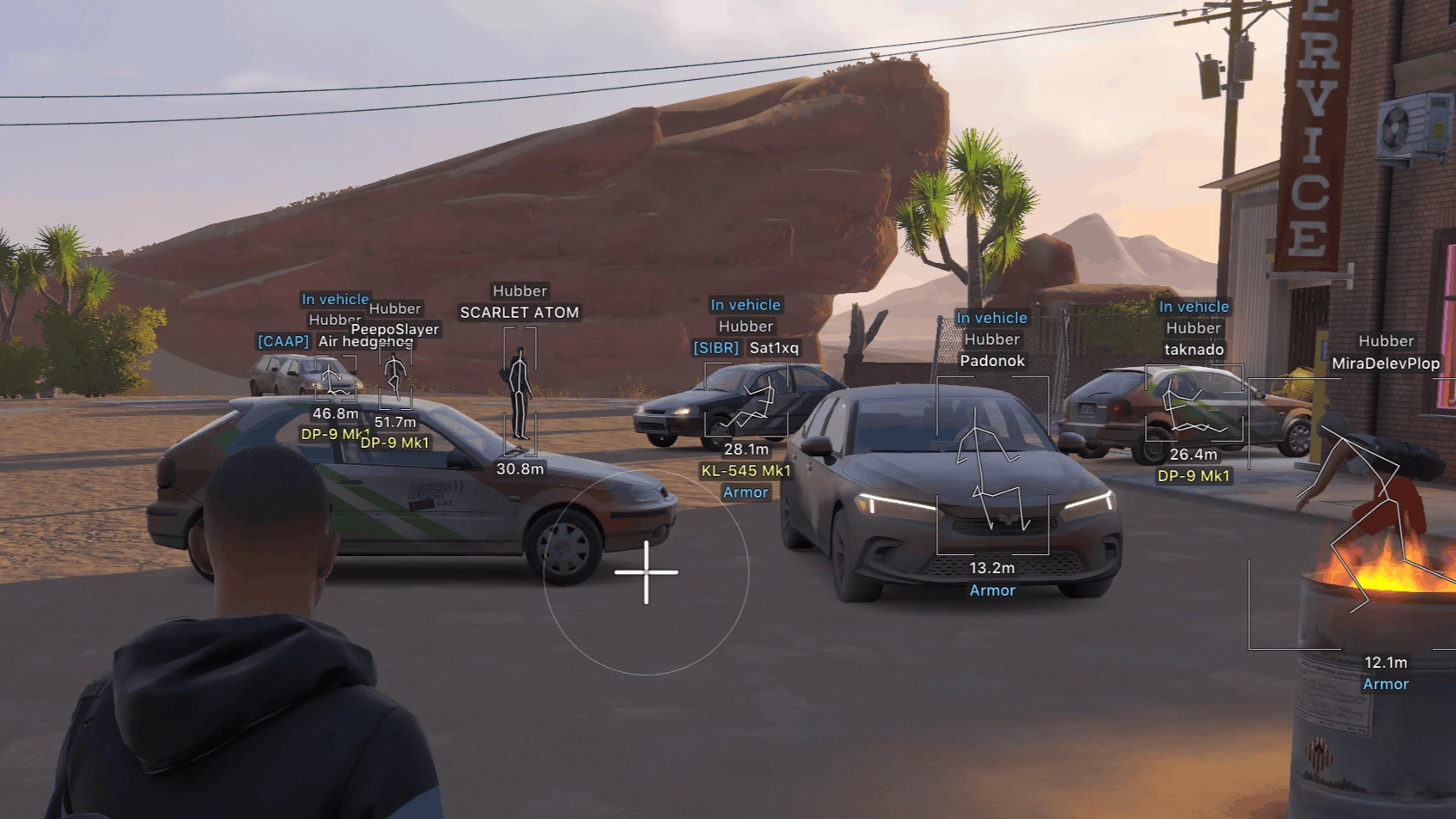
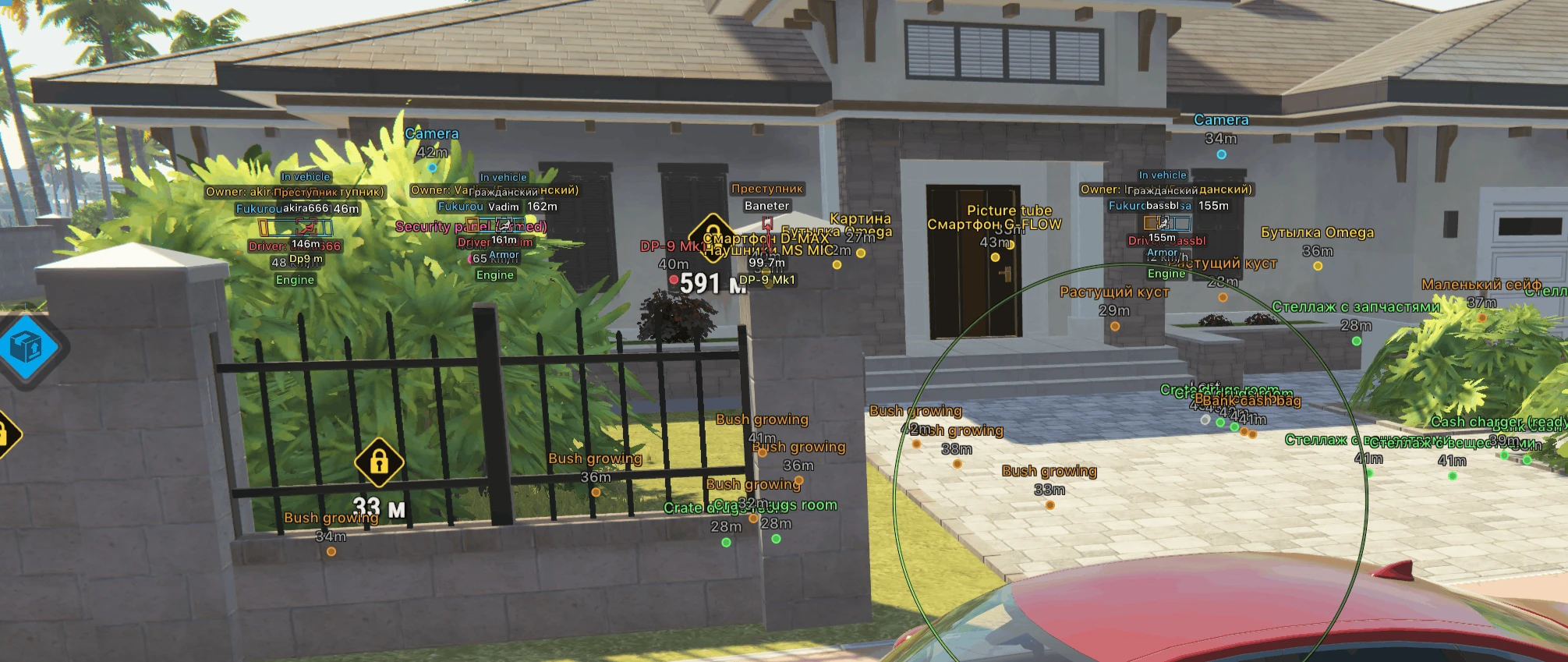
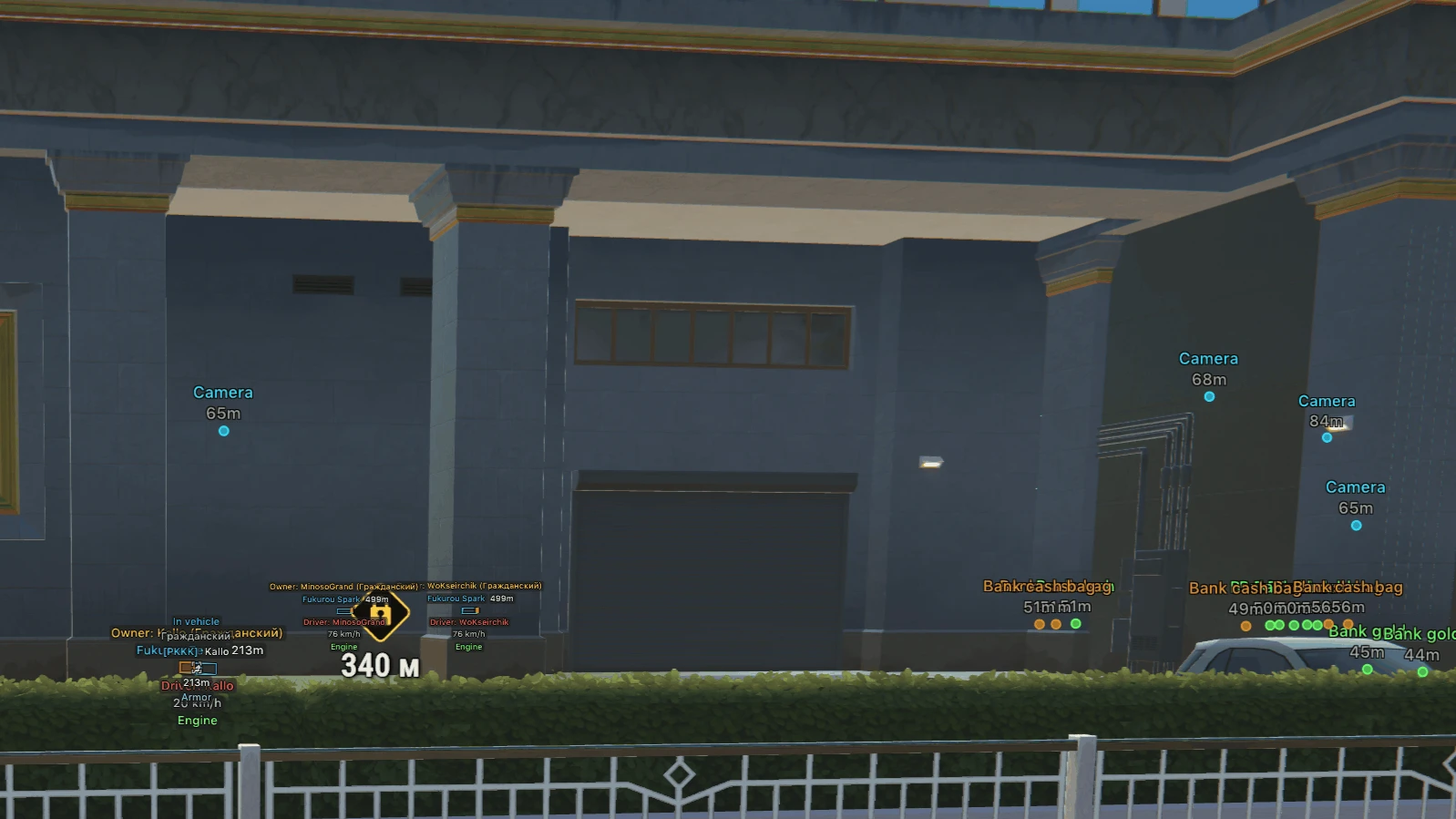
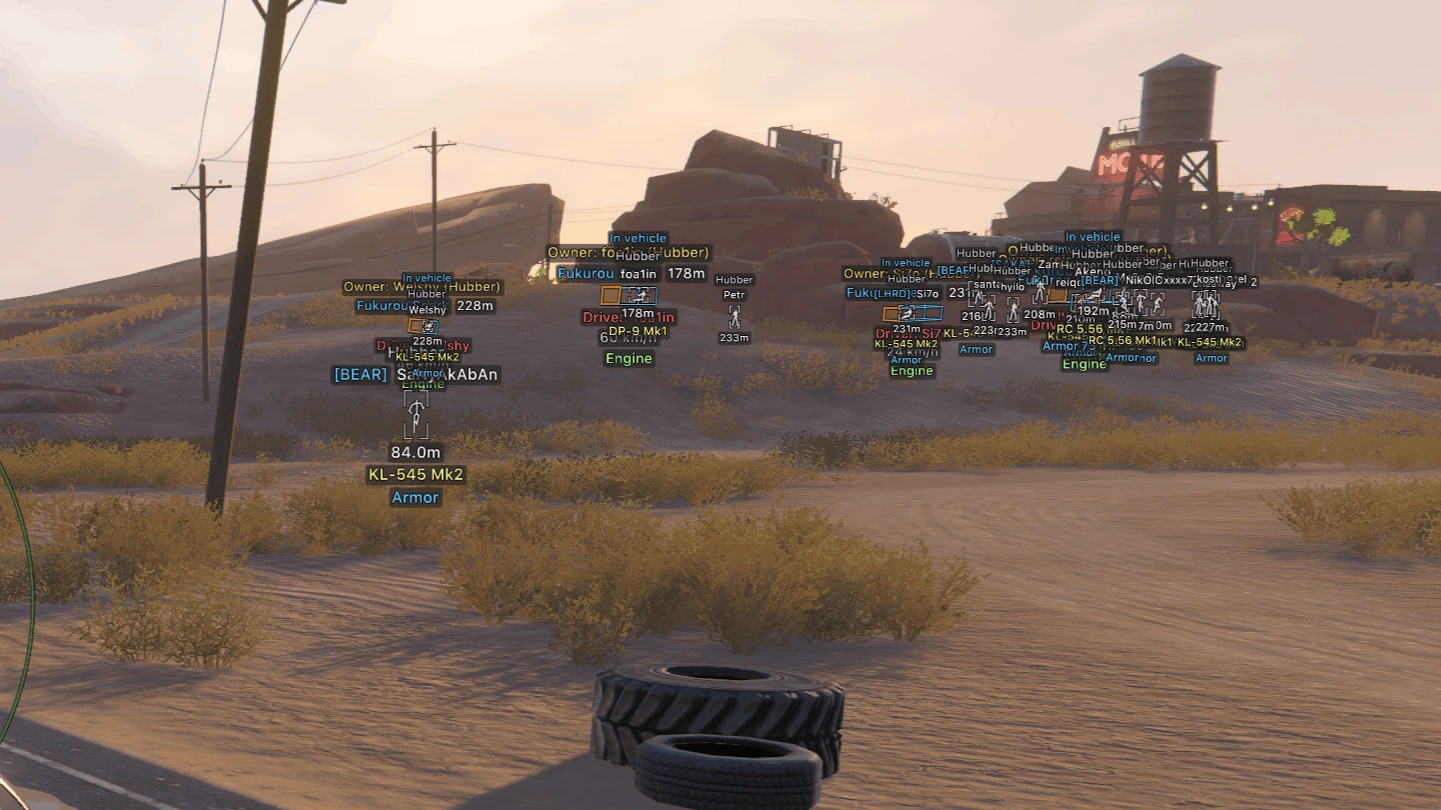
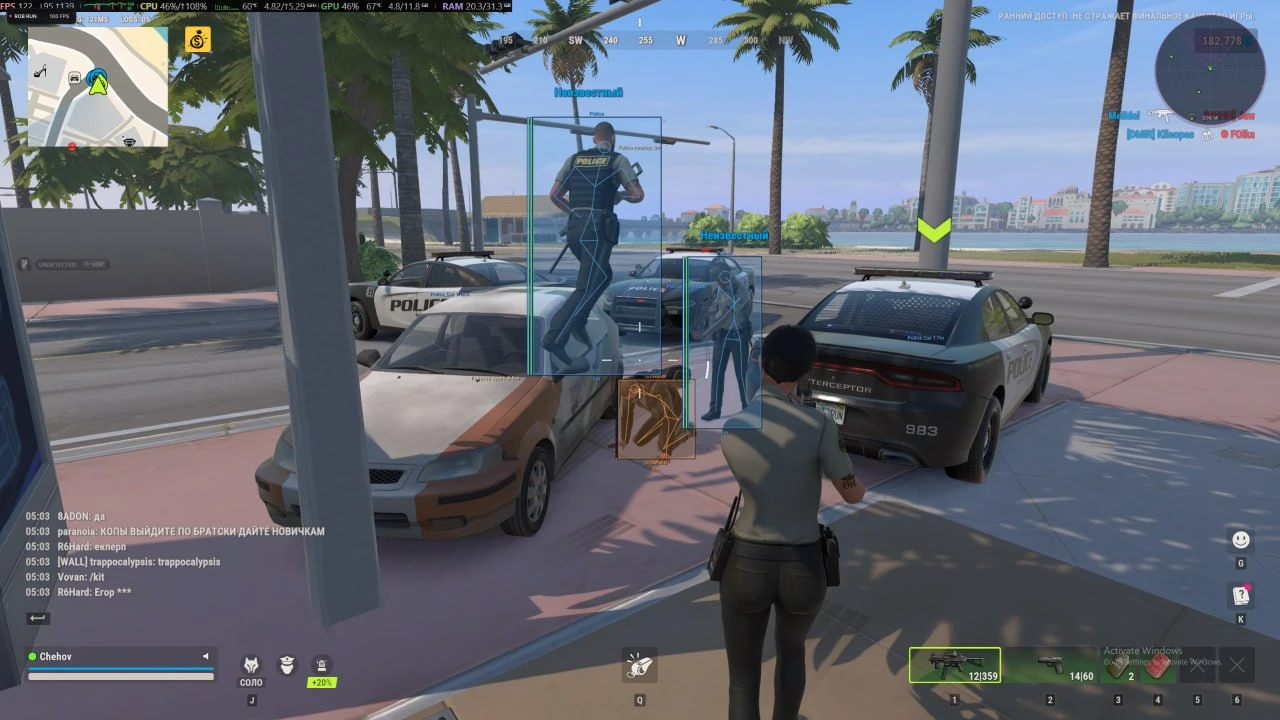
A robbery in Rob Run is decided before the first shot: which security cameras cover the way in, who in the crowd is a cop, a robber or just a civilian, and whether the car parked outside has someone behind the wheel. Arcane for Rob Run is a cheat that puts that whole picture on your screen. It combines an aimbot you can tune per weapon type, ESP for players, NPCs, vehicles, security cameras and loot, a radar with off-screen indicators, no recoil, no sway and no spread, and a battle mode that clears the screen when the shooting starts. The aimbot has a global profile plus separate settings for pistols, automatic weapons and everything else, so a sidearm and a rifle never share one setup. It runs on its own keybind, on hold or always on, has a separate force aim key, can be set to work only while you are aiming, and shift to head moves the aim up to the head. Lock target keeps it on one player, a target switch delay sets how quickly it moves on, and the humanization system with an adjustable factor makes the movement look less mechanical. You choose who it targets, from cops and robbers to civilians and NPCs, and it can ignore anyone dead, knocked or sitting in a vehicle. It goes for the bones you select, such as the head, neck, body or pelvis, or for the closest bone, within a maximum distance, while prediction with adjustable strength leads moving targets and a prediction cross of adjustable size marks the lead point. FOV size and smoothness decide how wide and how fast it reacts, adaptive FOV adjusts the capture zone automatically, and the FOV border with adjustable thickness, the FOV background and the locked target can be drawn on screen. For the weapon itself there is no recoil, no sway and no spread. Player ESP treats cops, robbers and civilians as separate categories, and the ESP preview in the menu shows how everything will look before you return to the game. Players can be drawn with a 2D or 3D bounding box, a regular or corner box with adjustable height and width and a static or gradient fill, a skeleton with adjustable thickness, a head circle and fading with distance, and a line to the enemy with its own color and position, in a style with or without a background. Next to each player Arcane can show the name, clan tag, role, held item, armor, health, state, whether they are in a vehicle, the distance and the player ID. Teammates, knocked players and players in vehicles get their own box and skeleton colors, dead and knocked players and your own team can be hidden altogether, and a maximum distance keeps the ESP to the range you care about. NPCs have an ESP of their own with the same box styles and preview, their name, state and distance, a maximum distance and an option to hide dead NPCs. Vehicle ESP labels every vehicle with its name, distance, owner, driver, speed and status, draws it in the same box styles with a static or gradient fill and a filled front face so you can tell which way it is facing, and can add a line to the vehicle in the color and position you set. It can be limited to occupied vehicles and can hide your own vehicle and the one you are sitting in. Camera ESP is the part made for robberies: it marks security cameras with their distance, gives working, broken and alarm-state cameras different colors, can hide the broken ones and draws each camera's view zone, filled if you want, so you can see exactly what it covers. Item ESP shows loot, loot nodes, cargo and cash chargers, filters loot by categories such as weapons, ammo, armor and equipment, shows the distance and can hide empty ones, and each of these ESPs has its own maximum distance. The radar shows cops, robbers, civilians and NPCs with distance rings and an FOV cone, can scale markers by distance, and lets you set the zoom, size, transparency and maximum distance, with targets beyond its range kept on the rim. Off-screen indicators with their own range, size and maximum distance point to targets outside your view. Battle mode sits on a separate keybind and strips the overlay down for a fight: it can show an indicator, switch to compact info, hide dead players, the radar and the off-screen indicators, and hide whole groups such as cops, robbers, others or vehicles. The menu opens on a key you choose and has a separate unload key, a DPI scale of 100, 125 or 150 percent, VSync and an FPS limit, a dark Murky or a light Sunny theme, a watermark, a one or two column layout, and English, Russian or Chinese. Configs can be created, loaded, saved, renamed and removed, so a setup for a heist and a setup for a street fight can sit side by side. Arcane does not warn you when a player gets close or looks your way: those alerts are what UDP is built around, and UDP is also the lighter choice if an aimbot, ESP and a radar are all you need. Arcane works with the Steam version of Rob Run in windowed or borderless mode, on Windows 10 and 11 x64 from build 1903 up to the latest, with no special CPU or GPU requirements. Plans cover 1 day, 3 days, 1 week or 1 month, and the key appears on the site and in your email as soon as the payment goes through. The status page always shows the current state of the cheat, and the Rob Run cheats page lists everything available for the game.
Aimbot:
- Weapon categories: (Global, Pistol, Automatic, Other)
- Enable
- Keybind
- Force aim key
- In scope
- Lock target
- Shift to head
- Max distance
- Target switch delay: (Delay)
- Humanization system: (Humanization factor)
- Ignore dead
- Ignore in vehicle
- Ignore knocked
- Target: (Cops, Robbers, Civilians, NPC...)
- Bone selection method: (Selected bones, Closest bone)
- Target bones: (Head, Neck, Body, Pelvis...)
- Activation: (On hold, Always)
- Prediction: (Prediction strength)
- Prediction cross: (Cross size)
- Adaptive FOV
- Draw FOV Border: (Thickness)
- Draw FOV Background
- Draw locked target
- FOV Size
- Smoothness
ESP Players:
- Categories: (Cops, Robbers, Civilians)
- Enable
- ESP preview
- ESP Style: (No background, With background)
- Max distance
- Bounding box: (2D, 3D, Box, Corner)
- Box height
- Box width
- Fill box: (Static, Gradient)
- Skeleton: (Thickness, Head circle, Fade with distance)
- Line to enemy: (Color, Position)
- Hide dead
- Hide team
- Team colors: (Box color, Skeleton color)
- Hide knocked
- Knocked colors: (Box color, Skeleton color)
- Name
- Clan tag
- Role
- Held item
- Armor
- State
- Health
- In vehicle
- Colors in vehicle: (Box color, Skeleton color)
- Distance
- ID
ESP NPC:
- Enable
- ESP preview
- ESP Style: (No background, With background)
- Max distance
- Hide dead
- Bounding box: (2D, 3D, Box, Corner)
- Name
- State
- Distance
Vehicles ESP:
- Enable
- ESP Style: (No background, With background)
- Max distance
- Only occupied
- Hide own vehicle
- Hide vehicle I am in
- Bounding box: (2D, 3D, Box, Corner)
- Front face: (Fill front face)
- Fill box: (Static, Gradient)
- Line to vehicle: (Color, Position)
- Vehicle name
- Distance
- Owner
- Driver
- Speed
- Status
Cameras ESP:
- Enable
- Max distance
- Distance
- Hide broken
- Colors: (Color, Broken color, Alarm color)
- View zone: (Fill zone)
ESP Items:
- Enable
- Max distance
- Distance
- Hide empty
- Objects: (Loot, Loot nodes, Cargo, Cash chargers...)
- Loot categories: (Weapons, Ammo, Armor, Equipment...)
Radar:
- Enable
- Distance rings
- FOV cone
- Scale by distance
- Zoom
- Size
- Transparency
- Entities: (Cops, Robbers, Civilians, NPC...)
- Max distance
- Show on rim
Off Screen:
- Enable
- Range
- Size
- Max distance
Misc:
- No recoil
- No sway
- No spread
Battle Mode:
- Keybind
- Show indicator
- Compact info
- Hide dead
- Hide radar
- Hide off-screen
- Hide: (Cops, Robbers, Others, Vehicles...)
Settings:
- Menu key
- Unload key
- DPI scale: (100%, 125%, 150%)
- VSync
- FPS limit
- Theme: (Murky, Sunny)
- Watermark
- Layout: (Two columns, One column)
- Language: (English, Russian, Chinese)
Configs:
- Create new
- Launch
- Save
- Edit name
- Remove
- Supported game version: Steam
- Supported game mode: Windowed / Borderless
- Supported CPU: Any
- Supported GPU: Any
- Supported OS: Windows 10-11 x64
- Supported builds: everything from 1903 to last one
YOU MIGHT ALSO LIKE
Reviews for Arcane [Rob Run]
No reviews yet. Be the first!